Snapchat Reels Downloader
Short-form vertical video has fundamentally changed how people consume content on mobile — and Snapchat is one of the platforms leading that shift. Whether you call them Reels, clips, or Spotlight videos, Snapchat's publicly shareable short-form content deserves better than a screen recording with your notification bar cutting across the top. Snap HDDown's Snapchat Reels Downloader gives you the original HD file — the exact MP4 that lives on Snapchat's servers — delivered to your device in under three seconds, completely free.
The tool is browser-based, which means it runs on anything with a web browser and an internet connection. No app installation. No account creation. No hidden fees or download limits that appear after a few uses. Paste the public Reel link, tap the button, preview the clip in the result card, and save it. That's the entire workflow — and it works identically on iPhone, Android, Windows, and Mac.
What Are Snapchat Reels?
The term "Snapchat Reels" has grown organically as mobile users borrow the short-form video language of Instagram and Facebook and apply it to all platforms. On Snapchat itself, these clips live primarily inside Spotlight — the algorithmic discovery feed — and on public creator profiles, where short vertical videos are posted for anyone to view. Whether the app labels them Reels, Snaps, or Spotlight clips, what users mean is the same: a publicly shareable, vertically formatted, sub-60-second video made for mobile viewing.
These clips share a consistent technical format: 9:16 vertical aspect ratio, typically encoded at 1080×1920 resolution, H.264 video codec with AAC audio, and delivered as an MP4 container. This is the same format used by Instagram Reels, TikTok, and YouTube Shorts — making downloaded Snapchat Reels immediately compatible with every short-form video platform and editing tool in the modern creator ecosystem.
What makes Snapchat Reels distinct from the competition is the platform's unique demographic reach. Snapchat commands an exceptionally strong presence with users aged 13–34 — a demographic that brands, researchers, and marketers specifically target. Content that resonates on Snapchat's Reel-style feed often predicts broader short-form trends before they peak on other platforms, which is exactly why downloading and studying Snapchat Reels has practical value beyond pure entertainment.
Snapchat Reels download as H.264 MP4 files at up to 1080×1920 (1080p), 30fps, with AAC stereo audio — fully compatible with Premiere Pro, Final Cut Pro, DaVinci Resolve, CapCut, iMovie, and every major editing application.
How to Download a Snapchat Reel — 3 Steps
The process is intentionally friction-free. There are no browser extensions to install, no accounts to create, and no multi-step verification flows. Three actions and you're done:
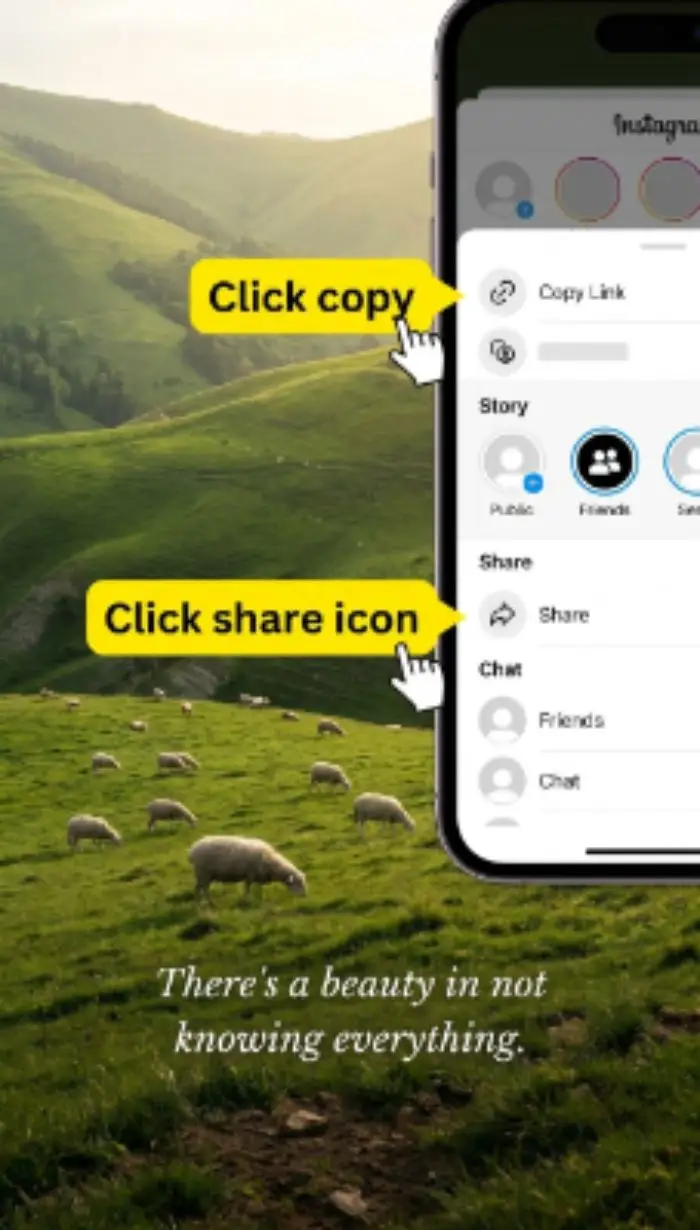
Copy the Reel Link
In the Snapchat app, tap the Share arrow on any Reel or Spotlight clip and select Copy Link. On the Snapchat website, copy the URL straight from your browser's address bar.
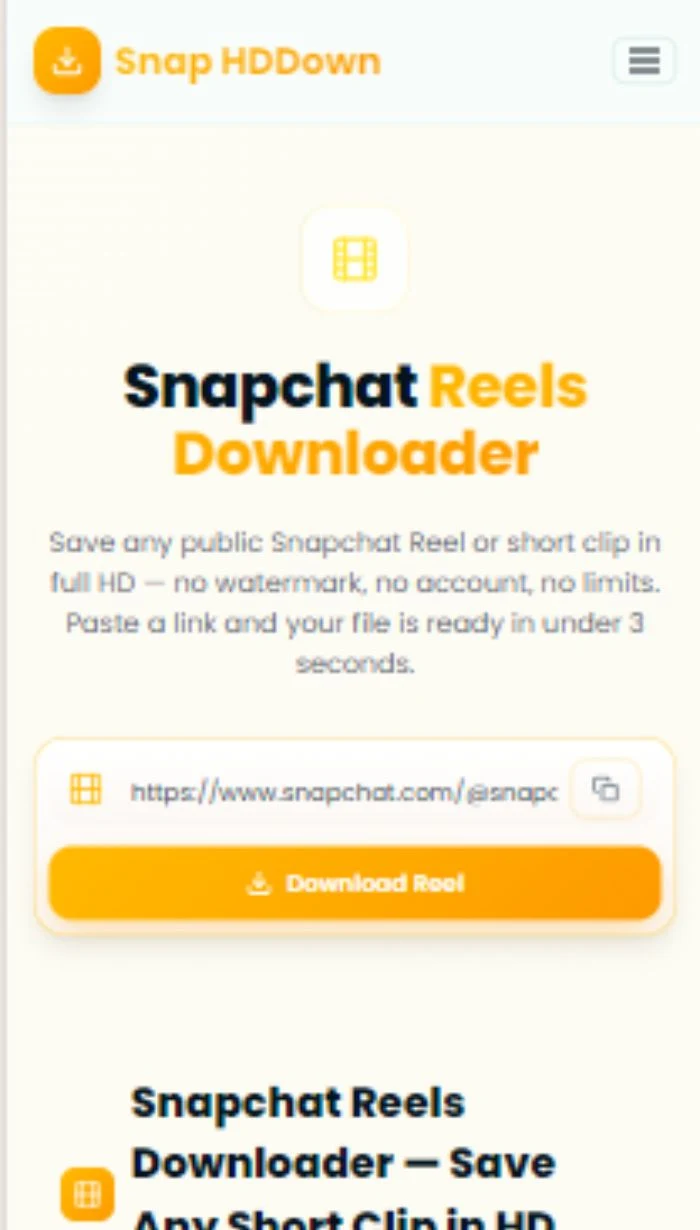
Paste & Process
Paste the link into the field above — or hit the clipboard icon to auto-paste your last copied URL. Tap Download Reel and our server extracts the media link in real time.
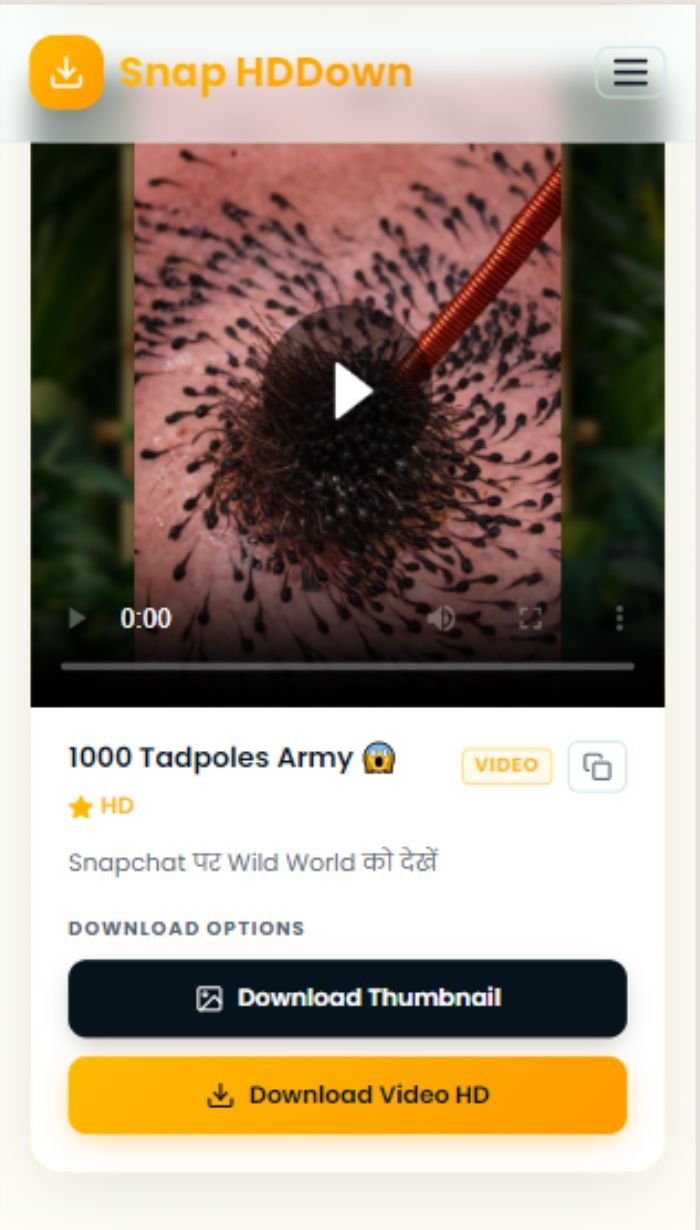
Preview & Save
The Reel loops in the inline player. When you're satisfied, tap Download Reel HD to save the original MP4 — or grab just the thumbnail with the dark button alongside it.
Tap the clipboard icon beside the input field right after copying your Reel link — it auto-pastes the URL, skipping the manual paste step. Then just tap Download Reel. Two taps from copy to download.
Why Snap HDDown Is the Right Tool for Snapchat Reels
Generic video downloaders often choke on Snapchat's dynamic page structure. Here is a precise breakdown of what Snap HDDown does differently — and why it matters for Reels specifically:
Real-Time Server Extraction
Snapchat Reels are delivered via JavaScript-rendered pages that most client-side tools can't parse. Our server handles page rendering and CDN URL extraction on the backend — bypassing the client-side limitation and returning results in under 3 seconds regardless of your device.
Full 1080p Vertical Resolution
We request the highest available resolution from Snapchat's CDN — never the compressed preview stream. Your downloaded Reel maintains the full 1080×1920 resolution at 30fps, exactly as uploaded by the creator, ready for editing or re-sharing.
No Post-Processing Watermarks
The file never touches a transcoder that could stamp our branding on it. We resolve and return the direct CDN link — your browser downloads the file from Snapchat directly, making watermark injection structurally impossible.
Loop Preview Player
The result card plays your Reel in a looping vertical player — the natural format for this content type. Confirm the right clip, check the quality, and watch it in context before committing to the download.
Cover Thumbnail Included
Alongside the video, every result includes the Reel's cover thumbnail at full resolution. Useful for article illustrations, video edit references, presentation decks, or any project where you need a still frame without frame-grabbing mid-video.
Direct CDN Link Copy
The copy icon in the result card places the raw Snapchat CDN URL on your clipboard. Feed it directly into Premiere's media import, a download manager, a Python script, or any tool that accepts a direct video URL.
How to Get a Snapchat Reel Link
The exact steps for copying a shareable Reel link differ depending on where you're viewing the content. Here's the complete guide for each scenario:
- Swipe to the Spotlight tab (star icon, bottom of screen)
- Scroll to the Reel you want to save
- Tap the Share arrow icon on the right side panel
- Select Copy Link from the share sheet
- Visit the creator's public Snapchat profile page
- Scroll to their posted Reels or clips section
- Tap any clip to open it in the viewer
- Tap Share → Copy Link
- Open the shared Reel link in your browser
- Wait for the full page load and any redirects to finish
- Copy the complete URL from the address bar
- Paste that expanded URL into the tool above
Saving Snapchat Reels on Every Device
The Download Reel button delivers the file to your browser — but how the browser handles that file differs by operating system. Here's what to expect and do on each platform:
- Paste the Reel link and tap Download Reel
- Long-press the looping video in the result card
- Tap Save Video from the contextual menu
- Clip saved to Photos → Recents
- Paste the Reel link and tap Download Reel
- Tap the Download Reel HD amber button
- Allow the download when your browser prompts
- File appears in Downloads / Gallery
- Paste the Reel link and click Download Reel
- Click the Download Reel HD button
- MP4 saves automatically to your Downloads folder
- Open in VLC, QuickTime, or import into your editor
Who Uses a Snapchat Reels Downloader — and Why
The range of people who need to save Snapchat Reels is much wider than casual viewers. Here are the six primary use cases, each with a distinct need and workflow:
Content Creators
Creators download their own Reels when the original source file is no longer accessible from the Snap app — recovering a clean, watermark-free MP4 that can be re-uploaded to TikTok, Instagram, or YouTube Shorts without quality loss.
Social Media Managers
Marketing professionals download trending Reels to build competitive analysis libraries — studying editing pace, caption hooks, audio trends, and format decisions that drive high engagement on the platform.
Journalists & Researchers
Reporters covering youth culture, social trends, or viral moments save Reels as contemporaneous evidence. A downloaded file is far more reliable than a link that could disappear before a story publishes.
Video Editors
Editors and filmmakers build reference libraries of standout Reels — using them for pacing inspiration, colour grade references, transition ideas, or studying the framing and visual storytelling techniques of successful short-form videos.
Brand Monitoring Teams
PR and brand teams download Reels that mention their products, campaigns, or executives — preserving user-generated content for internal reports, sentiment analysis, and legal documentation.
Everyday Viewers
Sometimes a Reel is just genuinely funny, beautiful, or moving — and you want it on your phone to re-watch offline, share with someone who doesn't use Snapchat, or simply keep because it made you smile.
Snapchat Reel Format Specs & Editing Compatibility
Understanding the technical specs of a downloaded Snapchat Reel matters if you plan to use it in a project, re-upload it to another platform, or import it into an editing application. Here's everything you need to know:
Resolution & Aspect Ratio
Snapchat Reels are produced and delivered at 1080×1920 pixels — the standard 9:16 portrait aspect ratio optimised for full-screen vertical viewing on every modern smartphone. This matches the native format for TikTok, Instagram Reels, and YouTube Shorts.
Codec & Container
H.264 video with AAC audio inside an MP4 container. This is the universal short-form video standard — natively supported by every device, platform, and professional editing suite without requiring any conversion or transcoding step.
Frame Rate
Most Snapchat Reels are encoded at 30fps — the standard for mobile-captured vertical content. Some creator uploads shot on newer smartphones may be encoded at 60fps where the source footage supports it.
Editing Software Compatibility
The H.264 MP4 file imports directly into Adobe Premiere Pro, Final Cut Pro, DaVinci Resolve, CapCut, iMovie, and any other NLE. No conversion needed — drag into your timeline and cut immediately.
Re-Upload Compatibility
The 9:16 1080p MP4 format is accepted without modification by TikTok, Instagram Reels, YouTube Shorts, Pinterest, and Facebook Reels. Upload the file directly — no resizing, reformatting, or aspect ratio adjustment required.
File Size Expectation
A typical 30-second Snapchat Reel at 1080p runs between 15–50 MB depending on scene complexity and bitrate. Longer clips or high-motion content will be larger — factor this in if you're saving to a device with limited storage.
Privacy, Data Handling & Responsible Use
Snap HDDown is built on two principles: maximum usefulness for you, and zero compromise on data privacy. Here's the transparent breakdown of how we operate — and what we expect from users.
What We Never Do
Using Downloads Responsibly
Troubleshooting Reel Download Issues
Nearly every problem has a straightforward fix. Here is the complete reference for every issue you might encounter:
The Reel was removed, the account went private, or you pasted a profile URL instead of a specific clip link. Open the URL in an incognito browser tab while signed out of Snapchat — if it doesn't play, our tool can't access it either.
Short Snapchat links (t.snapchat.com/…) redirect to the real URL — they're not direct video addresses. Open the short link in your browser, let it redirect fully, then copy the expanded address from the URL bar before pasting here.
Safari on iOS manages video downloads differently from desktop browsers. Long-press the video playing in the result card and select Save Video. Alternatively, tap Download Reel HD and use the iOS share sheet to choose Save to Files.
Check your editing software's supported formats. All major editors — Premiere Pro, Final Cut, DaVinci Resolve, CapCut — natively support H.264 MP4. If yours doesn't, use HandBrake to convert the file to H.265 or ProRes in seconds.
The in-browser preview may stream at a lower bitrate for speed. The actual downloaded file is always the highest available quality. Tap Download Reel HD and check the downloaded file — it will be full resolution.
File transfer speed is governed by Snapchat's CDN and your connection — not our servers. Use the copy button in the result card to get the direct URL, then paste it into a mobile download manager app for multi-threaded, faster transfers.
Frequently Asked Questions — Snapchat Reels Downloader
Straightforward answers to the most common questions about saving Snapchat Reels:
Pro Tips for Downloading Snapchat Reels
Always Expand Short Links
Short Snapchat links beginning with t.snapchat.com/… are redirects — open them in your browser first. Once the page loads fully, copy the expanded snapchat.com/spotlight/… URL from the address bar before pasting here.
Use the Clipboard Button
The clipboard icon next to the input field auto-pastes your most recently copied URL in one tap. Copy the Reel link in Snapchat, switch back to this page, tap the clipboard icon, then tap Download Reel. Faster than a manual paste.
Download for Editing — Not Streaming
If you plan to edit the Reel rather than just watch it offline, use the direct CDN URL from the copy button and import it into your editing software directly — skipping the browser's download step for a cleaner import workflow.
Save Reels While They're Live
Creators can remove Reels at any time, and Snapchat occasionally takes down content for policy reasons. If a clip catches your attention, download it immediately — a bookmarked link to a deleted Reel is useless.
Save Both Video & Thumbnail
The thumbnail download button saves the cover frame as a full-resolution JPEG — cleaner and sharper than any screenshot you'd take. Useful for blog posts, pitch decks, or social media previews where you need a static image alongside the video.
Test Accessibility Before Downloading
Open the Reel link in an incognito or private browser window while signed out of Snapchat. If the video plays, our tool can fetch it. If Snapchat prompts you to log in, the clip is restricted and cannot be downloaded by any external tool.
All Snapchat Downloaders on Snap HDDown
Snap HDDown has a dedicated, optimised downloader for every type of public Snapchat content — each tuned for its specific format and use case:
Spotlight Videos
Snapchat's algorithm-driven viral discovery feed. Any public Spotlight clip downloaded in full HD.
Spotlight DownloaderPublic Stories
Creator and brand Stories shared publicly — save individual Snaps before they disappear after 24 hours.
Stories DownloaderPhoto Snaps
Full-resolution still images from public Snapchat profiles and Stories — saved as clean image files.
Photos DownloaderProfile Photos (DP)
Full-resolution display pictures from any public Snapchat user profile — downloaded in one click.
DP DownloaderAll Snapchat Videos
The main downloader handles any public Snapchat video URL and auto-detects the content type.
Main DownloaderVideo Thumbnails
Save the cover frame from any public Snapchat video as a full-resolution JPEG — no screenshotting needed.
Thumbnail DownloaderReady to Save Your First Snapchat Reel?
Scroll up, paste the Reel link, and get the original 1080p HD file on your device in under 3 seconds — no watermark, no account, no limits. The cleanest Snapchat Reels download tool on the web, free forever.