Snapchat Story Downloader
Snapchat Stories were designed to disappear — but that doesn't mean you have to lose access to content you love. Whether it's a creator's travel vlog, a breaking news moment, a brand campaign, or a personal memory from an event you attended, public Snapchat Stories deserve a longer shelf life. Snap HDDown's Snapchat Story Downloader lets you save any publicly viewable Story as a clean, full-resolution video or photo file — in seconds, on any device, completely free.
Unlike screen recording, which degrades quality and captures your UI clutter, our tool fetches the original media file directly from Snapchat's delivery network. The result is the exact file the creator uploaded — full HD resolution, correct aspect ratio, zero watermarks. No Snapchat account required. No email sign-up. No software to install. Just paste, click, and save.
What Is a Snapchat Story?
A Snapchat Story is a collection of photos and short videos — called Snaps — that a user strings together into a sequential narrative. Each Snap within a Story lasts between 1 and 60 seconds. When a user views the Story, each Snap plays one after the other, creating a slideshow or mini-vlog experience.
Snapchat offers two categories of Stories. Private Stories are shared only with selected friends and are completely inaccessible to outside tools — including ours. Public Stories, posted by creators, brands, celebrities, and public accounts, are visible to anyone with the link, even without a Snapchat account. These are the Stories you can download with Snap HDDown.
Public Stories cover an enormous range of content: travel diaries, cooking tutorials, product launches, sports commentary, breaking news clips, fashion lookbooks, and event coverage. Creators invest real effort into producing them — and because they're time-limited by design, saving them before they expire is a completely reasonable response to great content.
Snap HDDown only works with public Stories accessible via a browser link without Snapchat login. Private Stories are inaccessible by design — we cannot and do not bypass privacy settings.
How to Download a Snapchat Story — 3 Simple Steps
Saving a Snapchat Story with Snap HDDown takes less than 30 seconds from start to finish. No technical knowledge needed — just a link and a tap.
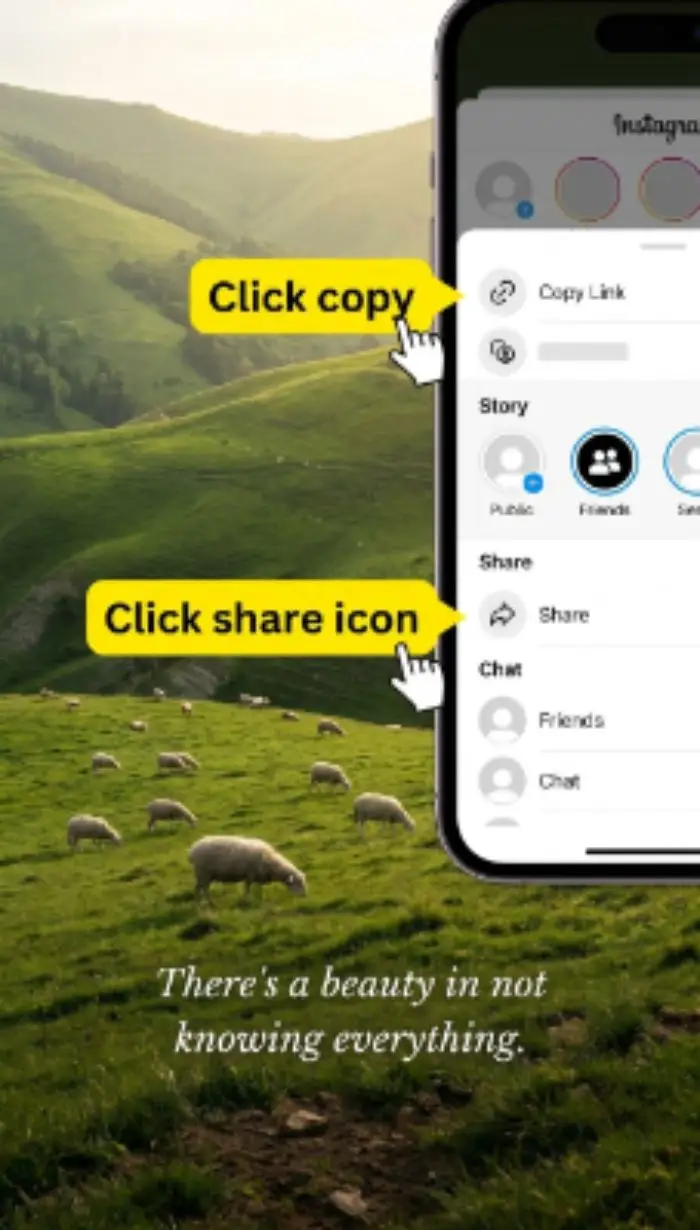
Copy the Story Link
Open the Snapchat app or website and find the public Story you want. Tap the Share icon and select Copy Link. On desktop, copy the full URL from your browser's address bar.
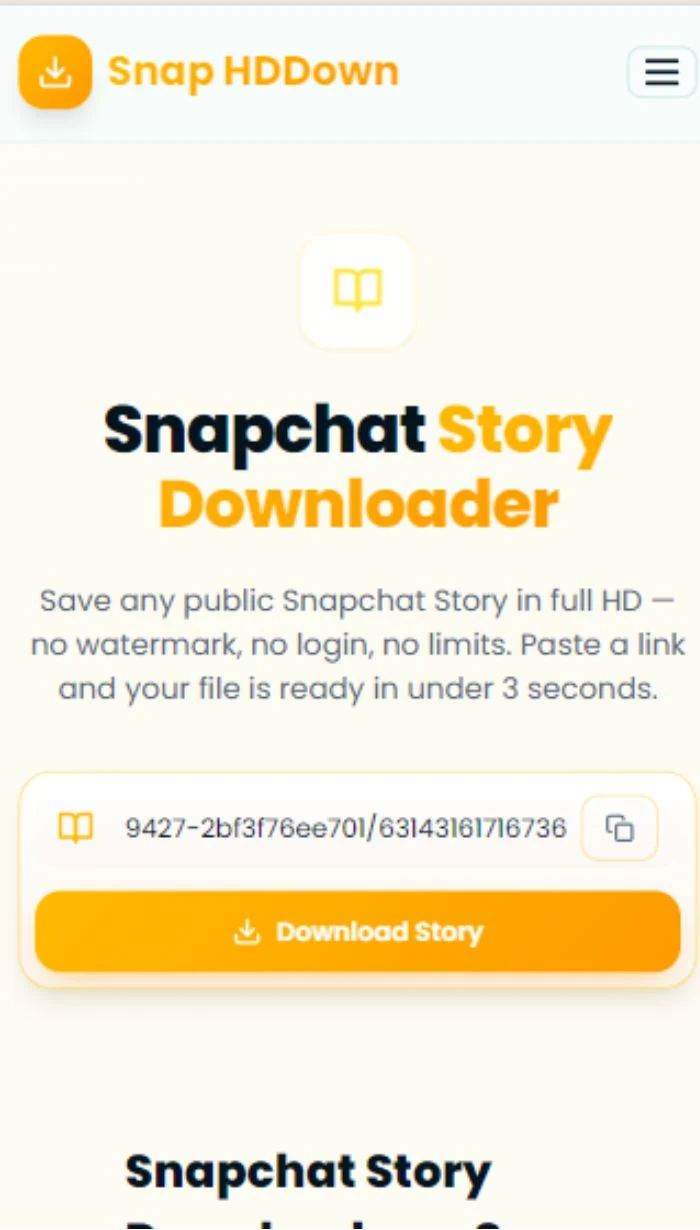
Paste & Submit
Paste the link into the input field above — or tap the clipboard icon to auto-paste. Hit Download Story and our server processes the link instantly.
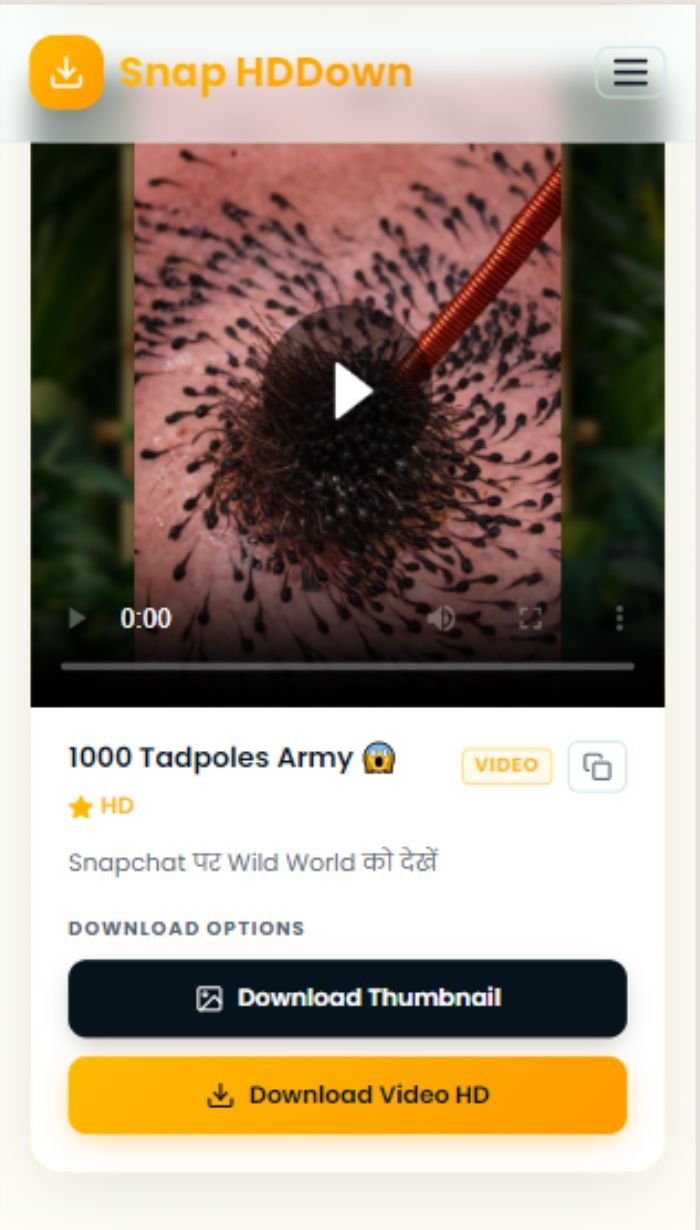
Preview & Save in HD
The result card shows an inline preview. Watch it, then tap Download Story HD to save the original file to your device — watermark-free, full resolution.
If the share link from the app begins with snap.com/… or is a short redirect, open it in your browser first so it expands to the full story.snapchat.com/… or snapchat.com/p/… URL — then copy and paste that expanded URL for the most reliable results.
Why Snap HDDown Is the Best Snapchat Story Downloader
There are dozens of tools that claim to download Snapchat Stories. Most are cluttered with pop-up ads, impose download limits, stamp watermarks on your files, or quietly collect your data. Here's what makes Snap HDDown genuinely different:
3-Second Processing
Our backend resolves Snapchat Story URLs server-side in real time. From the moment you hit Download, the media link is extracted and the result card loads in under 3 seconds on average — even on a slow mobile connection.
True HD Quality
We never transcode, compress, or re-encode the media. The file delivered to your device is the exact original as served from Snapchat's CDN — typically 1080p vertical video or full-resolution photo, with zero quality loss.
Absolutely No Watermark
We never overlay branding, URLs, or logos onto your downloads. What you get is a perfectly clean file you can use for editing, sharing, or archiving — indistinguishable from the original.
Zero Account Required
There's no registration, email form, or sign-in wall. We collect nothing about you. The moment you open this page, the tool is ready — no barriers between you and your download.
Video + Thumbnail Download
Every result offers two downloads: the full Story video in HD, and the cover thumbnail as a clean JPEG image. Save both with a single visit — no extra steps or page reloads needed.
Works on Every Device
iPhone, Android, Windows, Mac, or Linux — Snap HDDown runs entirely in your browser. No app install, no extension, no desktop software. Open the page and it works.
How to Copy a Snapchat Story Link
Getting the shareable link for a public Story differs slightly depending on whether you're on the Snapchat app or the web. Here's the exact method for each platform:
- Open the Snapchat app and navigate to the public Story
- Tap the three-dot menu (⋯) in the top-right corner
- Select Share Story from the options
- Tap Copy Link — the URL is now on your clipboard
- Visit story.snapchat.com in any browser
- Browse or search for the creator's public Story
- Click the Story to open it
- Copy the full URL from your browser's address bar
- Open the shared link from your chat or message
- The link opens in your browser — let the page fully load
- Copy the expanded URL from the address bar
- Paste that full URL into the tool above
How to Save a Story on Every Device
The download process is identical across all platforms — but where your file ends up after tapping the download button varies slightly by operating system. Here's the complete guide:
- Paste the Story link and tap Download Story
- Long-press the video in the result card
- Tap Save Video from the pop-up menu
- Video saved to Photos → Recents
- Paste the Story link and tap Download Story
- Tap the Download Story HD button
- Allow downloads when your browser prompts
- File saved to Downloads / Gallery
- Paste the Story link and click Download Story
- Click Download Story HD
- Browser saves the MP4 to your Downloads folder
- Open with VLC, QuickTime, or Windows Media Player
Why People Download Snapchat Stories
Snapchat Stories are ephemeral by design — but the reasons to save them are very real. Here are the most common use cases people bring to our Snapchat Story Downloader every day:
Archiving Your Own Content
Creators often lose access to their Stories after they leave the active feed. If you posted a Story you're proud of, downloading it before it expires is basic content hygiene.
Research & Trend Tracking
Marketing teams and journalists save trending Stories to study format patterns, viral hooks, and audience responses — offline analysis is far more effective than keeping a tab open.
Cross-Platform Sharing
Snapchat links don't embed natively in WhatsApp, Discord, email, or Slack. Downloading the video file lets you share it on any platform in any chat without compatibility issues.
Preserving Personal Memories
A friend's travel Story, a concert clip, or a community event captured by a local creator — these are moments worth keeping. Saving them gives them the permanence they deserve.
Content Repurposing
With the creator's permission, Story clips can become YouTube Shorts, Instagram Reels, TikTok content, or blog embeds. Downloading the source file is the essential first step.
Offline Viewing
Downloaded Stories play without any internet connection — ideal for flights, road trips, areas with poor coverage, or simply saving your mobile data plan.
Your Privacy & Responsible Use
We take privacy seriously — both yours as a user of this tool, and the rights of Story creators. Here is exactly how Snap HDDown handles data and what we expect from you as a downloader.
Our Commitments to You
Your Responsibility as a Downloader
Troubleshooting Story Download Issues
Most issues resolve instantly with a small adjustment. Here's a complete reference for every problem you might encounter:
The Story is private, expired, region-locked, or the URL is a profile link rather than a specific Story link. Test the URL in an incognito window — if it won't load without login, our tool can't fetch it either.
Your browser may be blocking the download. Check browser download permissions for this site. On iOS Safari, long-press the video player and choose Save Video instead of tapping the download button.
Snapchat Story videos are encoded as H.264 MP4 files. If your default player can't open them, install VLC — it handles every codec and is free for iOS, Android, Windows, and Mac.
Make sure you're pasting a direct Story link (story.snapchat.com/… or snapchat.com/p/…), not a creator profile URL or a short redirect. Expand any short links in your browser first.
Download speed depends on Snapchat's CDN, not our servers. Copy the direct media URL from the result card's copy button and use a dedicated download manager for multi-threaded transfers.
Update to a modern browser — Chrome 90+, Safari 15+, or Firefox 90+. Older versions lack clipboard API support and inline video playback, which are required for the tool to function correctly.
Frequently Asked Questions About Snapchat Story Downloading
Everything people most commonly ask about saving Snapchat Stories with Snap HDDown:
Pro Tips for Downloading Snapchat Stories
Always Expand Short Links First
Links shared via SMS or in-app DMs often start with snap.com/…. Open them in your browser, wait for the full redirect, then copy the expanded story.snapchat.com/… URL for best results.
Download Before It Expires
Public Stories can be removed or expire as accounts change settings. If you find a Story you want, save it immediately rather than returning to it later — it may be gone.
Test Accessibility in Incognito
Before pasting a link, test it in a private/incognito browser window without being signed into Snapchat. If the content loads there, our tool can fetch it. If it asks you to log in, it's private.
Save the Thumbnail Too
The thumbnail download button in the result card saves the Story cover image as a clean JPEG — perfect for blog embeds, social previews, or editorial reference without needing to screenshot a video frame.
Use a Download Manager for Large Files
For high-resolution Story videos on a slow connection, copy the direct CDN link from the result card's copy button and paste it into a download manager like IDM or Free Download Manager for resumable, faster transfers.
Bookmark This Page
If you regularly save Snapchat Stories, bookmark this page for instant access. It loads in under a second and works immediately — no ads to dismiss, no paywalls to bypass, no steps to skip.
All Snapchat Downloaders on Snap HDDown
Snap HDDown covers every format of public Snapchat content. Each dedicated page is optimized for its specific content type with format-specific tips and the fastest download flow:
Spotlight Videos
Snapchat's viral short-form video feed. Public by design. Download any Spotlight clip in full HD.
Spotlight DownloaderReels & Clips
Short vertical video content from creator profiles and Snapchat's discovery feeds.
Reels DownloaderPhoto Snaps
Still images shared publicly on Snapchat Stories or Spotlight feeds, in full resolution.
Photos DownloaderProfile Photos (DP)
Full-resolution display pictures from public Snapchat user profiles.
DP DownloaderAll Snapchat Videos
The main downloader handles any public Snapchat video link — paste and it detects the format automatically.
Main DownloaderVideo Thumbnails
Save the cover frame from any supported Snapchat video as a clean, full-resolution JPEG file.
Thumbnail DownloaderReady to Save Your First Snapchat Story?
Scroll to the top, paste your public Story link, and download the original HD video in under 3 seconds — no watermark, no account, no catch. Free forever.